
Categories
Tag Cloud
How to Create a New Folder in cPanel File Manager
Using folders enables you to organise and structure your files more effectively and makes it easier to manage your website.
Creating a new folder is a simple process when you use the cPanel File Manager. Just follow these steps.
1. Log in to your cPanel account.
2. Scroll to the Files section and click on File Manager.
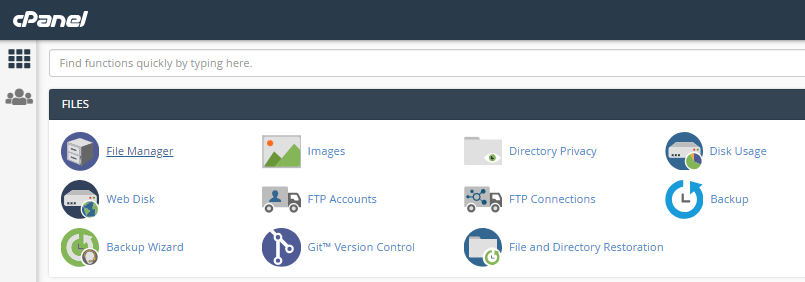
3. To start creating a folder, click on the ‘+ Folder’ icon in the tools ribbon at the top left side of the page.
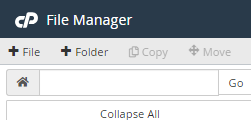
4. When you click +Folder a pop-up form will appear.
5. On the form, type the name you want for the folder on the top line and add its destination on the bottom line.
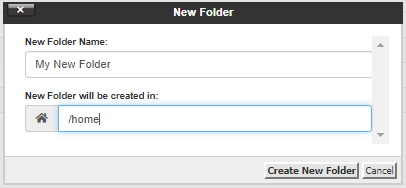
6. When you have inputted the details, click the Create New Folder button.
7. The new folder will now be created in your specified location.
Credits: Eukhost
If you need specific help, contact our Support Team. or call us directly at +254105503412
Feel free to click the thumbs up below to help many others in need of similar solutions, thank you and God bless!
Using folders enables you to organise and structure your files more effectively and makes it easier to manage your website.
Creating a new folder is a simple process when you use the cPanel File Manager. Just follow these steps.
1. Log in to your cPanel account.
2. Scroll to the Files section and click on File Manager.
3. To start creating a folder, click on the ‘+ Folder’ icon in the tools ribbon at the top left side of the page.
4. When you click +Folder a pop-up form will appear.
5. On the form, type the name you want for the folder on the top line and add its destination on the bottom line.
6. When you have inputted the details, click the Create New Folder button.
7. The new folder will now be created in your specified location.
Credits: Eukhost
If you need specific help, contact our Support Team. or call us directly at +254105503412
Feel free to click the thumbs up below to help many others in need of similar solutions, thank you and God bless!



