
Categories
Tag Cloud
How to change PHP version in Cpanel
From your cPanel control panel, you can change your php version within minutes.
Follow these steps –
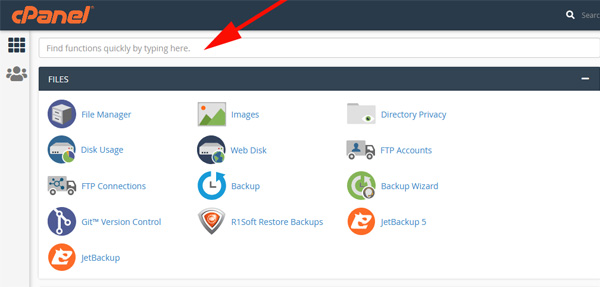
Access Cpanel Login Page- In the cPanel home after typing your username and password search for Select PHP Version
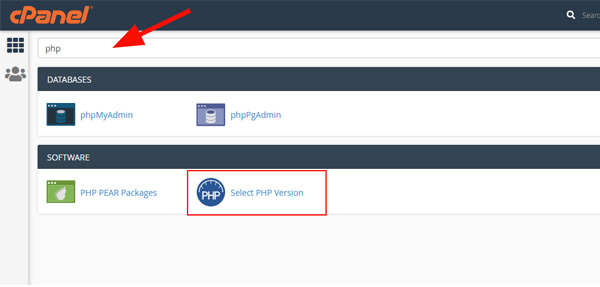
3. or go to the SOFTWARE section of the cPanel home screen, click Select PHP Version:
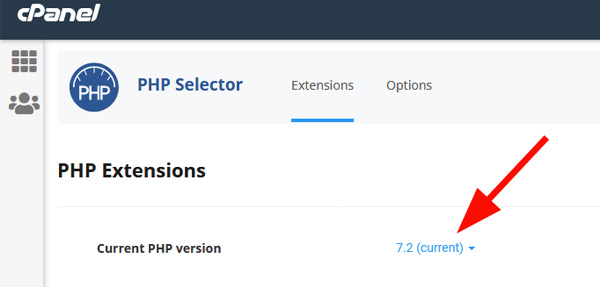
4. The below window will appear, click on current
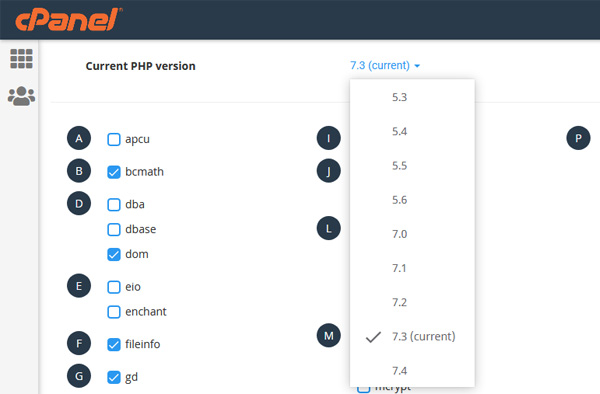
5.The below dropdown will appear
 z
z
6. Click on the version you want and thats all! :-)
If you need specific help, contact our Support Team.
Feel free to click the thumbs up below to help many others in need of similar solutions, thank you and God bless!
From your cPanel control panel, you can change your php version within minutes.
Follow these steps –
Access Cpanel Login Page- In the cPanel home after typing your username and password search for Select PHP Version
3. or go to the SOFTWARE section of the cPanel home screen, click Select PHP Version:
4. The below window will appear, click on current
5.The below dropdown will appear
z
6. Click on the version you want and thats all! :-)
If you need specific help, contact our Support Team.
Feel free to click the thumbs up below to help many others in need of similar solutions, thank you and God bless!



