
Categories
Tag Cloud
Image logo not showing on webmail signature
Image logo not showing on webmail signature can be corrected by going to go Settings > Preferences > Composing Messages. Then change the "Compose HTML messages" is to Always (only HTML messages can have formatting like font and size) then on the same screen there is "Default font for HTML message" which can be changed to your suitable font. Follow this simple steps to show image on your signature. This applies to cPanel webmail users either using roundcube, horde or after logic interface,
- Login to your webmail here
- Go to settings on your left panel
- select preference
- Select Compose message
- Under Compose message change to always
- Click on save changes
Diagramatic representation after login in to webmail
1.  select settings
2.  select "Preferences"
3.  select "Compose Messages"
4.  Default is "never"
5. 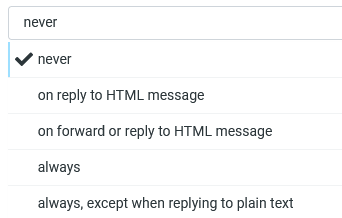 Change to "always"
6.  Save settings.
That is all you need to show your logo image when composing or replying to a message using webmail in cpanel.
If it helped don't forget to put a thumbs up below to help someone else. God blessings in Christ Jesus!
Image logo not showing on webmail signature can be corrected by going to go Settings > Preferences > Composing Messages. Then change the "Compose HTML messages" is to Always (only HTML messages can have formatting like font and size) then on the same screen there is "Default font for HTML message" which can be changed to your suitable font. Follow this simple steps to show image on your signature. This applies to cPanel webmail users either using roundcube, horde or after logic interface,
- Login to your webmail here
- Go to settings on your left panel
- select preference
- Select Compose message
- Under Compose message change to always
- Click on save changes
Diagramatic representation after login in to webmail
1. select settings
2. select "Preferences"
3. select "Compose Messages"
4. Default is "never"
5. Change to "always"
6. Save settings.
That is all you need to show your logo image when composing or replying to a message using webmail in cpanel.
If it helped don't forget to put a thumbs up below to help someone else. God blessings in Christ Jesus!



