
Categories
Tag Cloud
How to generate EPP code from Client Area
How to generate EPP code from Client area
EPP code or transfer code is a domain password that is required to move your domain from one registrar to another. It ensures that only the owner can transfer the domain and therefore unauthorized person can not transfer a domain.
The process of getting Epp code from the client area is straight forward. here are the four easy steps to follow. However, before generating Epp code, make sure the domain admin contact email is accessible and the registrar lock is disabled.
1. Login to your client area.

2. Go to My domains section under domains menu or click on domains as shown below 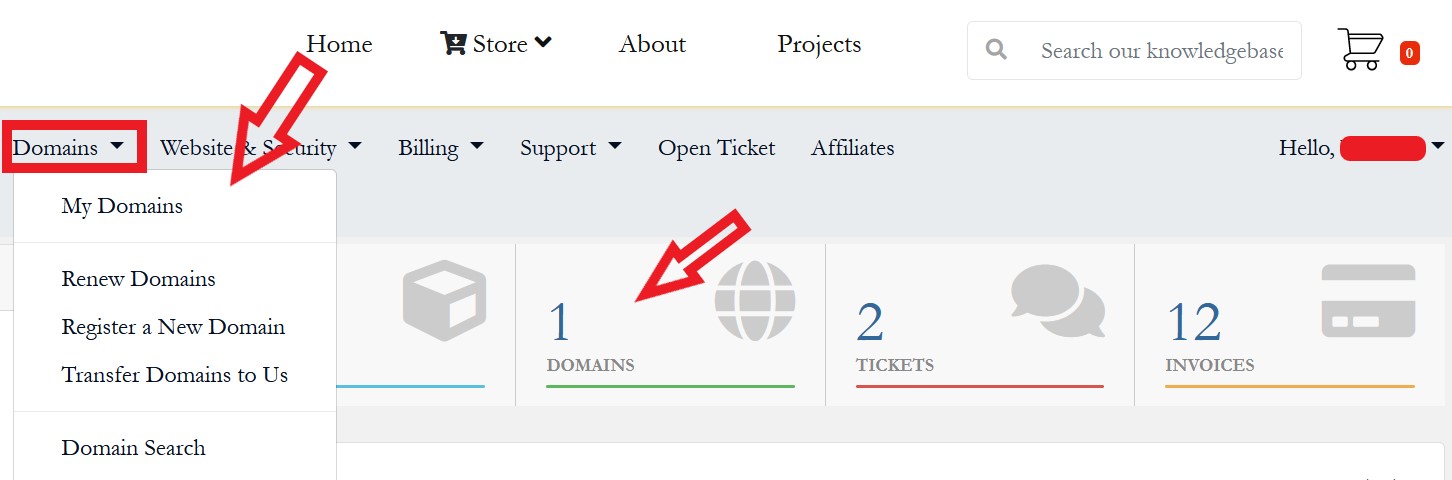
3. Click on the green active button to manage the domain you want to fetch epp code
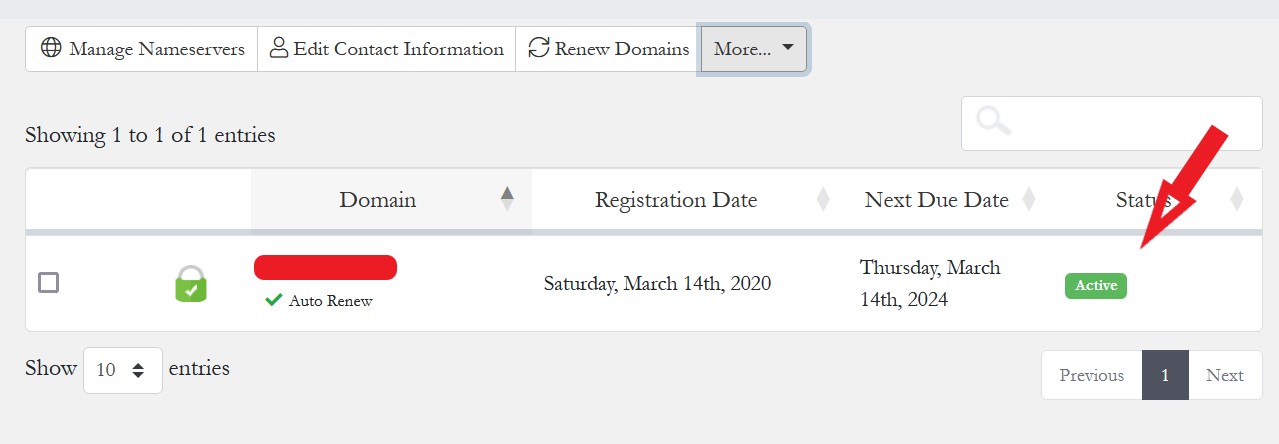
4. Go to the domain you want to generate EPP code to manage.

4. Click get Epp code for it to be generate. Below is an example of an EPP Code Generated.

N/B. Remember to click on Register Lock and unlock the domain so that your transfer does not stall.
Hope this helps? if finding challenges feel free to open a ticket for further support
How to generate EPP code from Client area
EPP code or transfer code is a domain password that is required to move your domain from one registrar to another. It ensures that only the owner can transfer the domain and therefore unauthorized person can not transfer a domain.
The process of getting Epp code from the client area is straight forward. here are the four easy steps to follow. However, before generating Epp code, make sure the domain admin contact email is accessible and the registrar lock is disabled.
1. Login to your client area.
2. Go to My domains section under domains menu or click on domains as shown below
3. Click on the green active button to manage the domain you want to fetch epp code
4. Go to the domain you want to generate EPP code to manage.
4. Click get Epp code for it to be generate. Below is an example of an EPP Code Generated.
N/B. Remember to click on Register Lock and unlock the domain so that your transfer does not stall.
Hope this helps? if finding challenges feel free to open a ticket for further support



