
How to create WhatsApp link to chat and use in your website

WhatsApp's click to chat feature allows you to begin a chat with someone without necesarilly having their phone number saved in your phone's address book. As long as you know this person’s phone number and they have an active WhatsApp account, you can create a link that will allow you to start a chat with them.
By clicking the link, a chat with the person automatically opens. Click to chat works on both your phone and WhatsApp Web.
Learn how to do it in 3 simple ways:
1. Create your own link - Personal Number
Use https://wa.me/<number> where the <number> is a full phone number in international format. Omit any zeroes, brackets, or dashes when adding the phone number in international format.
Examples: Use: https://wa.me/1XXXXXXXXXX
Don't use: https://wa.me/+001-(XXX)XXXXXXX
Create your own link with a pre-filled message
The pre-filled message will automatically appear in the text field of a chat. Use https://wa.me/whatsappphonenumber?text=urlencodedtext where <span">whatsappphonenumber is a full phone number in international format and urlencodedtext is the URL-encoded pre-filled message.
Example:
https://wa.me/1XXXXXXXXXX?text=I'm%20interested%20in%20website%design%20for%20services%20and%20web%20hosting
To create a link with just a pre-filled message, use https://wa.me/?text=urlencodedtext
Example:
https://wa.me/?text=I'm%20inquiring%20about%20the%20apartment%20listing
After clicking on the link, you’ll be shown a list of contacts you can send your message to.
We have many ways to go about the same
2. WhatsApp Business App Link
If you’re using the WhatsApp Business app, you can share a short link with your customers that they can use to start a chat with you.
If a customer opens the short link on a device with WhatsApp installed, it opens a chat between the two of you. If they open the short link on a web browser, they will be sent to a web page with your business information and your default message if one’s been assigned. From there, they can click CONTINUE TO CHAT to open a chat with you on WhatsApp.
Note: If you’ve selected to share your profile picture with Everyone in your privacy settings, your profile picture will appear on the web page as well. Learn how to change your privacy settings in this article.
Creating a short link
A short link for your business is automatically generated when you create an account on the WhatsApp Business app. To access this short link:
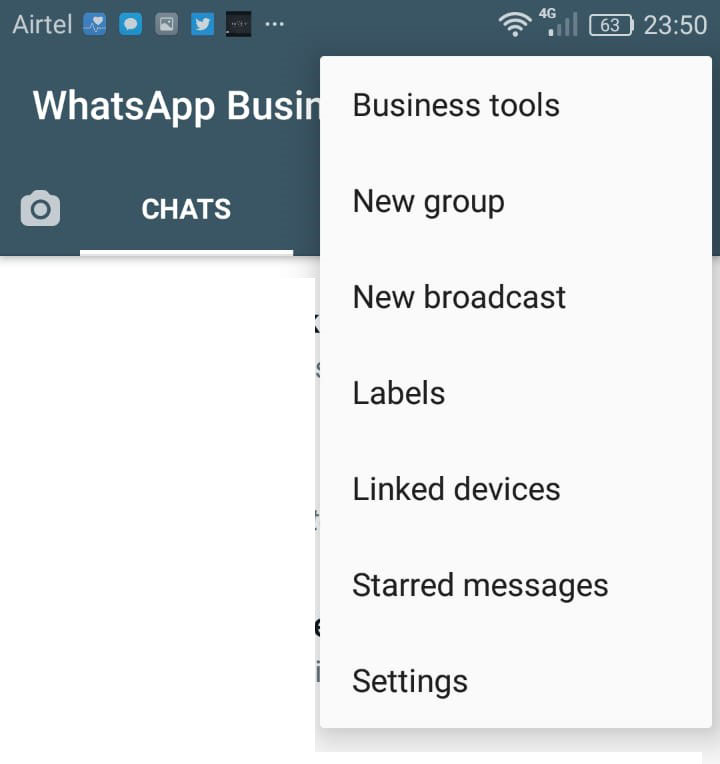
Step 1. Open the WhatsApp Business app Settings by clicking the 3 vertical dots on your to right.

Step 2. Click on Business Tools
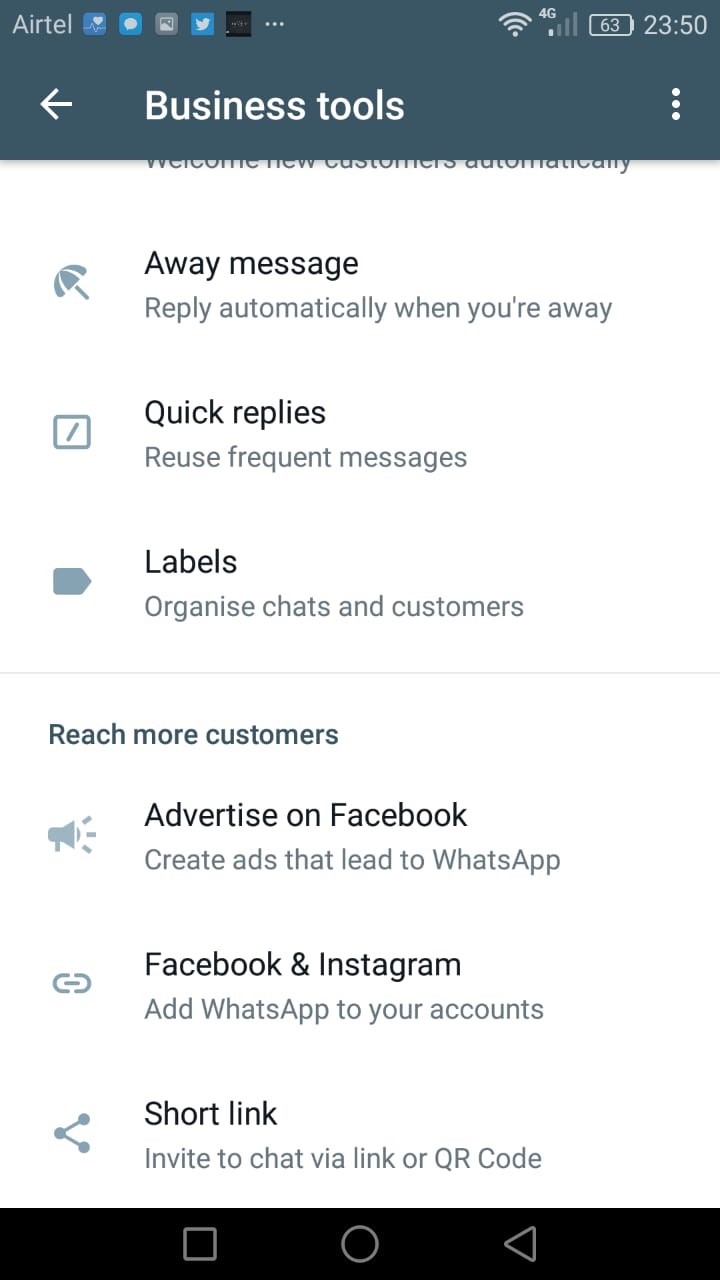
Step 3. Scroll Down and Tap on Short link to view the auto-generated link.
Step 4. Once you’ve accessed the short link, you can:
- Tap
 if you wish to copy the short link and paste it somewhere else on your website or other Facebook pages.
 - Tap
 if you wish to directly send this link over to your customers. Anyone who has access to the link will be able to message you.
 - Tap the slider to set a message template for customers to use when they open the short link.
- Tap
 to create and edit your default message.
Note: Your customers will be able to edit the default message.
3. Create link using Third Parties
WhatsApp also a feature that allows people to create links, so any user can click and start a conversation (chat) directly with the person who created the link. As you don’t have to save anyone’s phone number to message them, it simplifies interaction. You can achieve this by using the selected few third parties.
a) Walink.
Walink comes in, we provide a tool which you can use to generate shortened WhatsApp links, with the wa.link domain. This will increase your chat conversions, and it’s free. Go to wa.link now and get your generated code now
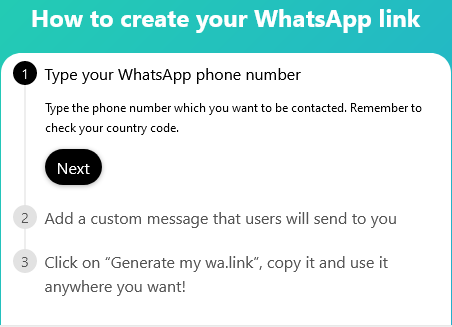
If you want to go a step further and add it to your website you must at least have a basic knowledge of Content Management Systems (CMS) customization and programing language, in case you want help on the same feel free to Contact Us Via Whats Up or through our website
We also have other solutions that can be beneficial to you which include:-
b) Elsfight
Online application that can make you work easier. The most common one being elsfight the pros of this its easier to get you started since its just a code that you embed on your website still with basic knowledge CMS customization and programing language or through your website developer.
The cons for this are that it only allows 200 views a monthly fee of 5 dollars for concurrent usage which is till limited to 5000 views, after which you need to upgrade unlike the wa.link which is unlimited usage unless you want premium features
c) Plugins
Using plugin like, WP Social Chat (WhatsApp Chat WP) – Free and Premium or WordPress WhatsApp Support – Premium for WordPress CMS users or EB WhatsApp Chat for Joomla CMS Users.
In Conclusion, I hope this gives you a solution on how to get a WhatsApp link and how to go a step further to adding it to your website for more engaging interactions with your clients. Don't Forget to give us a thumbs up:-). Blessings to you in Christ Jesus!



