
Categories
Tag Cloud
How to Deactivate Wordpress Plugin from Cpanel
Disable All WordPress Plugins in cPanel
- Login to your cPanel.
- Click the File Manager in the Files section.

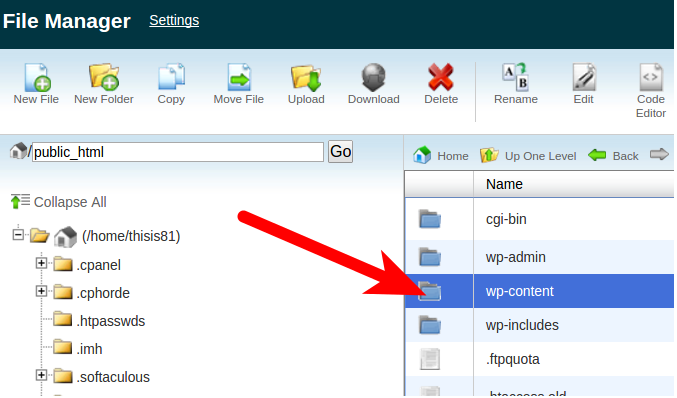
- Navigate to your WordPress installation folder, and open the wp-content folder.
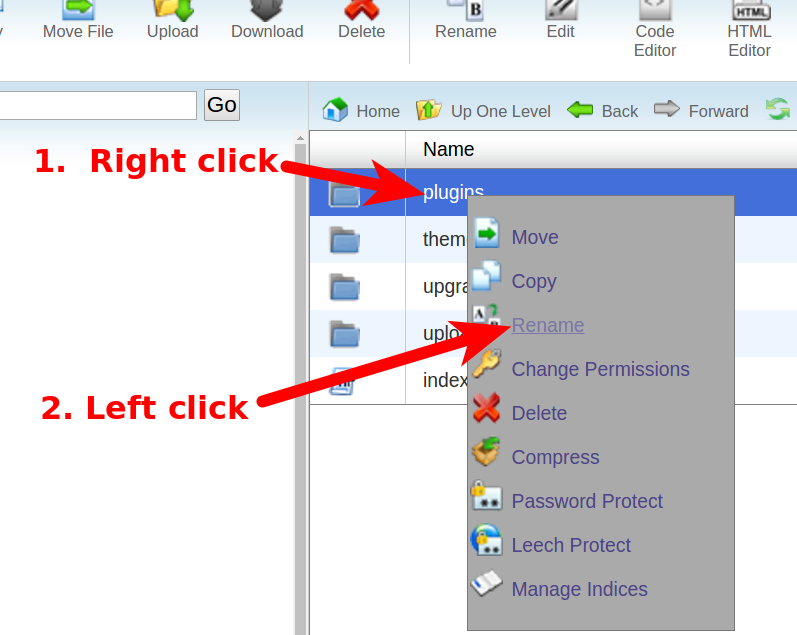
- Right-click the plugins folder, then select Rename.
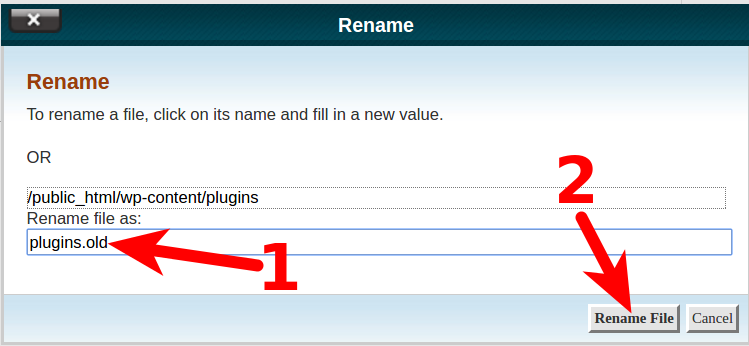
- Rename the plugins folder, for example “plugins.old” then click the Rename File button.
All of your WordPress plugins are now disabled.
N/B: If you want to disable only one plugin enter the plugin directory and rename the specific plugin to "name_of_plugin.old" remember to replace name_of_plugin with the specific plugin you want to deactivate
Congratulations, now you know how to disable (deactivate) your WordPress plugins from the Cpanel.
If you need specific help, contact our Support Team.
Feel free to click the thumbs up below to help many others in need of similar solutions, thank you and God bless!
Disable All WordPress Plugins in cPanel
- Login to your cPanel.
- Click the File Manager in the Files section.
- Navigate to your WordPress installation folder, and open the wp-content folder.
- Right-click the plugins folder, then select Rename.
- Rename the plugins folder, for example “plugins.old” then click the Rename File button.
All of your WordPress plugins are now disabled.
N/B: If you want to disable only one plugin enter the plugin directory and rename the specific plugin to "name_of_plugin.old" remember to replace name_of_plugin with the specific plugin you want to deactivate
Congratulations, now you know how to disable (deactivate) your WordPress plugins from the Cpanel.
If you need specific help, contact our Support Team.
Feel free to click the thumbs up below to help many others in need of similar solutions, thank you and God bless!



