If you need specific help, contact our Support Team.
Feel free to click the thumbs up below to help many others in need of similar solutions, thank you and God bless!

Softaculous users can now directly login to the installation’s admin panel from Softaculous Enduser Panel without the need to enter admin username and password.
Log into cPanel as the user that installed the WordPress website (in Softaculous).
In the cPanel search bar, type soft.
Click on the Softaculous icon.
In the header, to the right, click on the All Installations icon.

If you do not want your users to be able to sign in directly to the installation’s admin panel using Auto Login feature from Softaculous Enduser Panel, you may disable the same from Softaculous Admin Panel.
Go to Softaculous Admin Panel -> Settings -> General Settings In Enduser Panel Setting Section -> Disable Auto Login.
Initially this setting is unchecked which means that the user can directly enter the script’s admin panel from Softaculous EndUser Panel without entering the admin username and password. Check this option in order to disable Sign On.
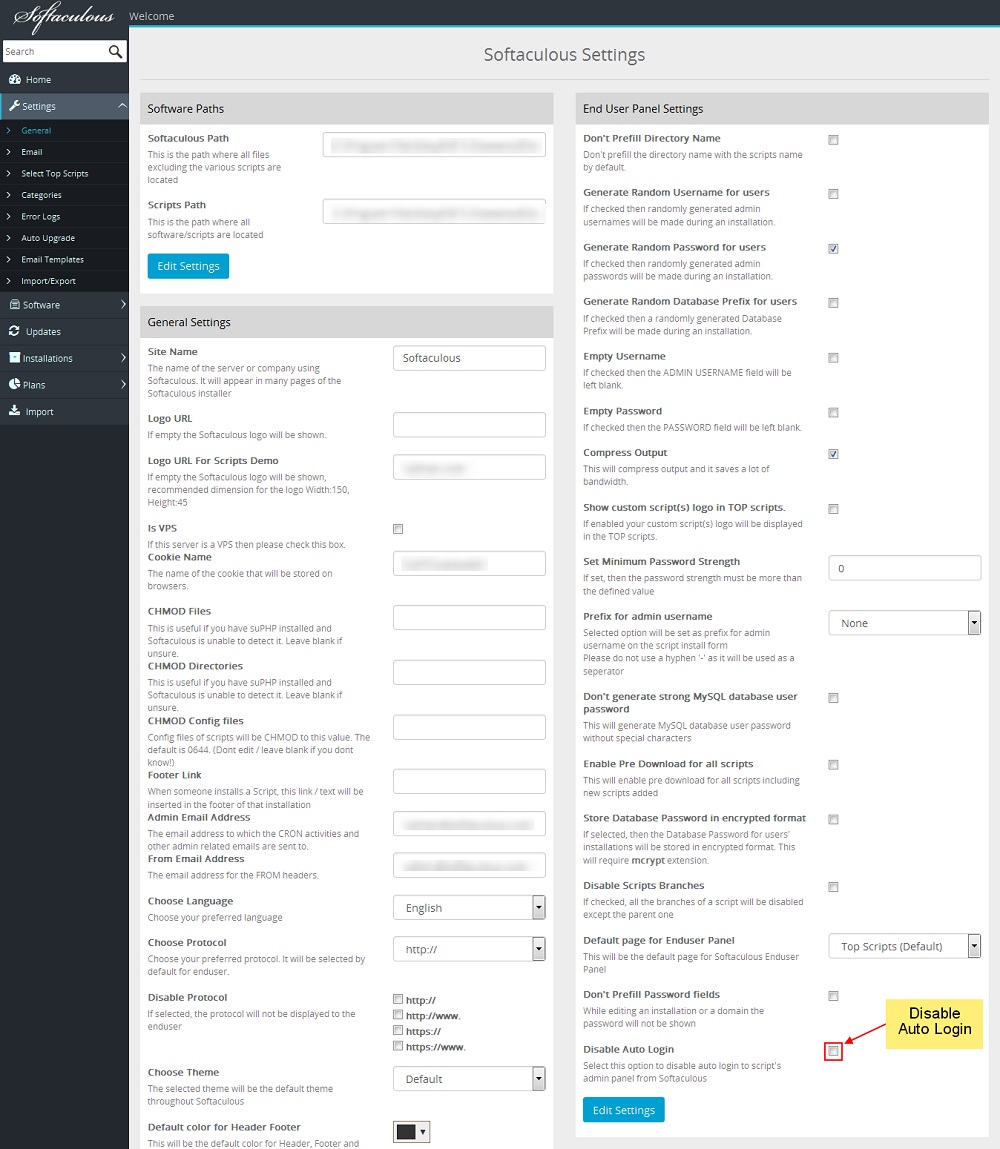
If the setting is checked, user will be redirected to a page where he is required to enter the username and password to login to the script’s Admin Panel
If you need specific help, contact our Support Team.
Feel free to click the thumbs up below to help many others in need of similar solutions, thank you and God bless!
Let's get you started



Get a free consultation on web design, hosting, domains & digital marketing.