
Categories
Tag Cloud
How to Change WordPress Admin Password directly from the Database

Changing Wordpress Admin Password directly from the Database is the easiest way to regain your Wordpress Backend access
You can resolve this problem by resetting your password from your hosting account control panel. by following this simple steps/guide
- Open cPanel.
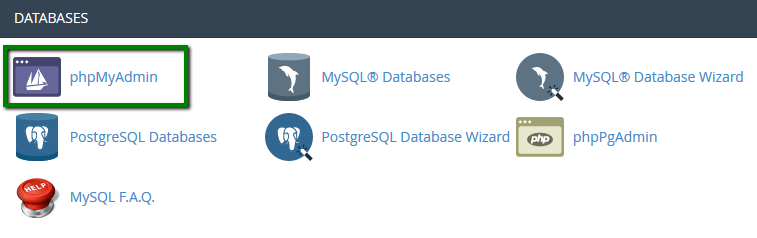
- Scroll down and locate the Databases Select phpMyAdmin.You’ll be redirected to phpMyAdmin’s administration page.
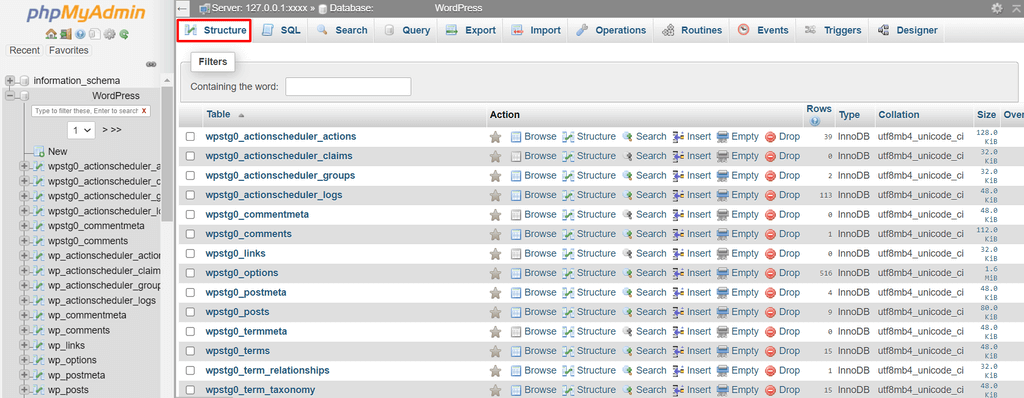
- On the left side of thePHP My Admin page, click the database you want to change
- Select Structure. Scroll down to find wp_users and click it.
- You’ll see the login credentials of the site’s users. Click Edit.
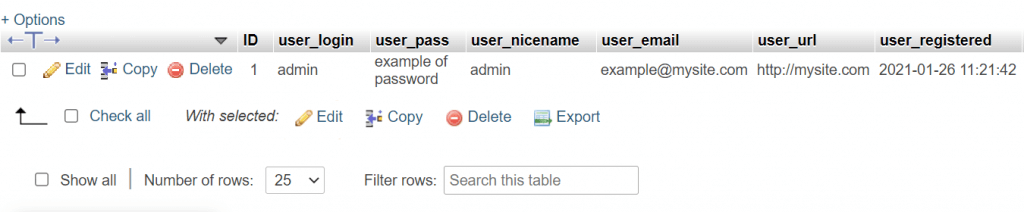
- Type in the new password in the user_pass column to change it, then make other changes as needed.
- Change the Function value of your password to MD5 (Used to add an additional layer of security).

- Press Go to save the changes.
With the newly created password log in into WordPress website. Hope this helped you? please do not hesitate to give us a thumbs up below to help someone else. God Bless you in Christ Jesus!
Changing Wordpress Admin Password directly from the Database is the easiest way to regain your Wordpress Backend access
You can resolve this problem by resetting your password from your hosting account control panel. by following this simple steps/guide
- Open cPanel.
- Scroll down and locate the Databases Select phpMyAdmin.You’ll be redirected to phpMyAdmin’s administration page.
- On the left side of thePHP My Admin page, click the database you want to change
- Select Structure. Scroll down to find wp_users and click it.
- You’ll see the login credentials of the site’s users. Click Edit.
- Type in the new password in the user_pass column to change it, then make other changes as needed.
- Change the Function value of your password to MD5 (Used to add an additional layer of security).
- Press Go to save the changes.
With the newly created password log in into WordPress website. Hope this helped you? please do not hesitate to give us a thumbs up below to help someone else. God Bless you in Christ Jesus!



